


To hide the navbar in your blogger or blogspot go to edit html in your blogger settings and paste this css code after template information #navbar #Navbar1 iframe { display:none; } thats it the blogger banner will be gone forever for example see below paste the red colored code after the template information /***********************************************/ #navbar #Navbar1 iframe { display:none; } |
Showing posts with label Blogging. Show all posts
Showing posts with label Blogging. Show all posts
Friday, June 29, 2007
How to Hide Blogger Navbar
Monday, June 18, 2007
Redirecting a blog to another site
First thing to do always before you make any changes to the template is to backup the template. If you are not familiar with the method to do it, refer to Backing up and changing New Blogger templates. First, sign into your Blogger Dashboard, click LAYOUT, then click the EDIT HTML sub-tab. This will open the template editor window. Add this block of codes into your template just below the <head> tab which should be very near the top of the template: <meta name="robots" content="noindex" /> Then add this just below the <body> tag: <p><a href="URL of where you want the blog to be redirected"></a>.</p> Make sure to replace URL of where you want the blog to be redirected with the actual URL of the site you want to redirect to. |
Friday, June 15, 2007
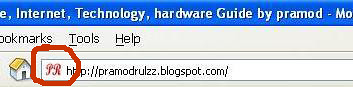
Adding an icon to your blog/Website
For who those don't know what icon for a blog is then take a look at the pic above,You can see the icon of google in the adress bar(The one which has been highlighted with a red circle).This is the kind of icon we are going to put to your blog.Just follow the steps listed below
you can also put animated icon here. I tried many things for this and finally today i got it. |
Subscribe to:
Posts (Atom)